
Encountering this error? It’s caused by restrictive execution policies that block scripts for security reasons. This guide explains the issue and provides actionable solutions.
PowerShell restricts script execution by default. Running a script like my example cdk.ps1 may trigger the following error message:
Script.ps1 cannot be loaded because running scripts is disabled on this system. For more information, see about_Execution_Policies at https://go.microsoft.com/fwlink/?LinkID=135170

This happens due to PowerShell’s default security settings, which restrict script execution to prevent unauthorized or malicious scripts from running.
Why Does This Happen?
By default, PowerShell applies an Execution Policy that controls how scripts are executed. These policies include:
- Restricted: No scripts are allowed to run (default setting)
- AllSigned: Only scripts signed by a trusted publisher can run
- RemoteSigned: Local scripts can run, but downloaded scripts need to be signed
- Unrestricted: All scripts can run without restrictions (not recommended)
The Fix: Change Your Execution Policy
To allow PowerShell scripts to run on your system, you need to change the execution policy. Follow these steps:
Step 1: Open PowerShell as Administrator
Step 2: Check Your Current Execution Policy
# Check current execution policy status
Get-ExecutionPolicy -List
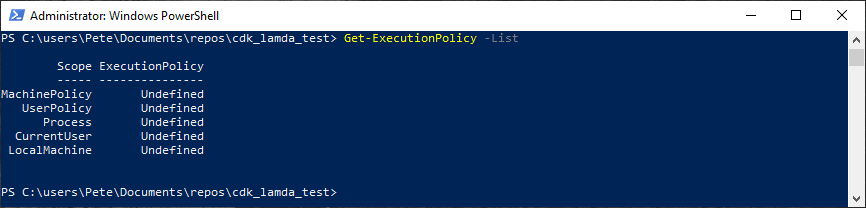
Step 3: Modify the Execution Policy
To allow local scripts and signed remote scripts to run, execute the following command:
# Set local execution policy to remote signed
Set-ExecutionPolicy -Scope LocalMachine -ExecutionPolicy RemoteSigned

Alternatively, if you need a temporary solution that resets after closing PowerShell, run:
# Set local execution policy for current session
Set-ExecutionPolicy -Scope Process -ExecutionPolicy Bypass

Step 4: Confirm the Change
Run the following command to verify your new execution policy:
# Check current execution policy status
Get-ExecutionPolicy -List
If the policy is now set to RemoteSigned, you should be able to run your script without issues.
Important Considerations
Security First:
Avoid setting your execution policy to Unrestricted, as it allows all scripts to run, which can be a security risk.
For One-Time Script Execution:
Use Bypass at the process level to avoid permanently changing security settings.
If Running on a Corporate System:
Your execution policy may be managed by an IT administrator. In such cases, contact your IT team for assistance.
If SQL Server is part of your day job, my current work lives over at sqldba.blog: production DBA scripts, an error library and the SSMS guide.
When the Error Comes Back With a Different Message
Setting RemoteSigned fixes the original error, and then a script you downloaded from a browser or copied from a network share fails again with a new message. This is the next trap along, and it is a different problem with a different fix. Tested on PowerShell 7.6.5:
.\script.ps1 : File C:\scripts\script.ps1 cannot be loaded.
The file C:\scripts\script.ps1 is not digitally signed.
You cannot run this script on the current system.
Windows stamps downloaded files with the mark of the web, a small Zone.Identifier stream attached to the file. Under RemoteSigned, local scripts run fine but anything carrying that stamp is treated as remote and must be signed. The fix is Unblock-File, not a looser execution policy:
# Remove the mark of the web from one script
Unblock-File .\script.ps1

# Or from everything in a folder you just pulled down
Get-ChildItem .\scripts\*.ps1 | Unblock-File
I verified this end to end: a script stamped with ZoneId=3 is blocked under RemoteSigned with the message above, and runs immediately after Unblock-File.
Which Scope Actually Wins
The Get-ExecutionPolicy -List output is ordered by precedence, and the first defined value from the top wins. MachinePolicy and UserPolicy come from Group Policy and beat everything, then Process, then CurrentUser, then LocalMachine.
That order matters for permissions too. Changing LocalMachine requires an elevated console, and I have a short guide on opening PowerShell as Administrator on sqldba.blog if the option is not where you expect. The CurrentUser and Process scopes need no admin rights at all, which is usually the polite fix on a shared or locked-down machine:
# Session only, no admin needed, gone when the window closes
Set-ExecutionPolicy -Scope Process -ExecutionPolicy Bypass

# Or for a single run, without touching any setting
pwsh -ExecutionPolicy Bypass -File .\script.ps1
powershell.exe -ExecutionPolicy Bypass -File .\script.ps1
I tested both on PowerShell 7.6.5. The Process scope change succeeded from a non-elevated console, and the -ExecutionPolicy Bypass launch parameter ran a mark-of-the-web stamped script that the same console refused to run without it.
Windows PowerShell and PowerShell 7 Keep Separate Policies
If you fix the policy in the blue Windows PowerShell console and your script still fails in pwsh, or the other way round, nothing is broken. Windows PowerShell 5.1 and PowerShell 7 store their execution policies separately, so a change in one does not carry over to the other. Their defaults differ as well. Windows PowerShell defaults to Restricted on client editions of Windows, while PowerShell 7 ships with an effective policy of RemoteSigned on Windows, which is what my 7.6.5 install reports out of the box.
So before changing anything, run Get-ExecutionPolicy -List in the exact console that is refusing the script. It takes five seconds and it tells you which scope is doing the blocking rather than leaving you to guess.
When Set-ExecutionPolicy Does Not Stick
On a domain-managed machine, Set-ExecutionPolicy can report that it updated the policy but that the setting is overridden by a policy defined at a more specific scope. That is Group Policy talking. If MachinePolicy or UserPolicy shows a value in Get-ExecutionPolicy -List, no local change at any scope will win, including Process.
In that situation the honest answer is a conversation with whoever owns the GPO, not a workaround. The policy is there because someone decided unsigned scripts should not run on that estate, and as a DBA I would rather request a signed-scripts process than quietly defeat the control. Document what you need to run and where, and the exception is usually straightforward.

Leave a Reply