
Execution trace messages in SQL Server Agent error logs can be helpful for diagnosing issues. This guide explains how to enable this option.
Logs are always important if you’re supporting systems. The SQL Server Agent is used very often by DBA’s and Software Devs, so writing execution trace messages to the logs might be useful for investigating a random complex issue.
This guide follows the Microsoft Documentation page: Write Execution Trace Messages to the SQL Server Agent Error Log
Enabling the execution trace messages option comes with the following warning: it will make your error logs to become large in size, this should only be enabled during troubleshooting and disabled thereafter.
I’ve never enabled this before and discovered the option today. Hope this is useful!
Writing Execution Trace Messages to the SQL Agent Error Log
1. Open SQL Server Management Studio (SSMS).
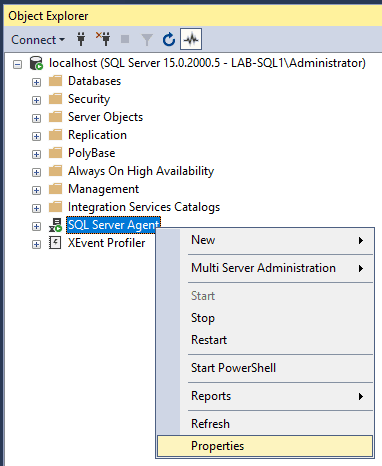
2. Right-click SQL Server Agent within the SSMS Object Explorer.
3. In the General tab, check the box for Include execution trace messages.
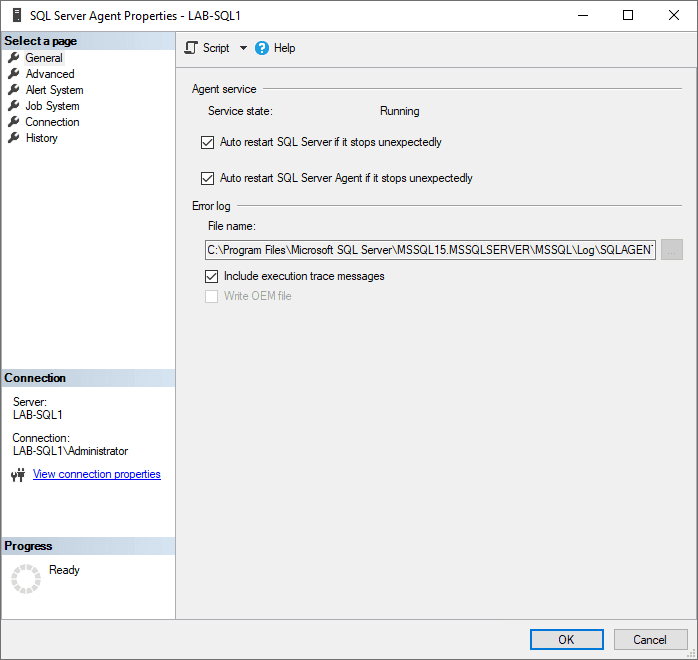
This feature is ideal for situations requiring detailed execution traces to identify specific SQL Server Agent problems. Once the issue is resolved, consider disabling this option to prevent excessive log growth.
Leave a Reply