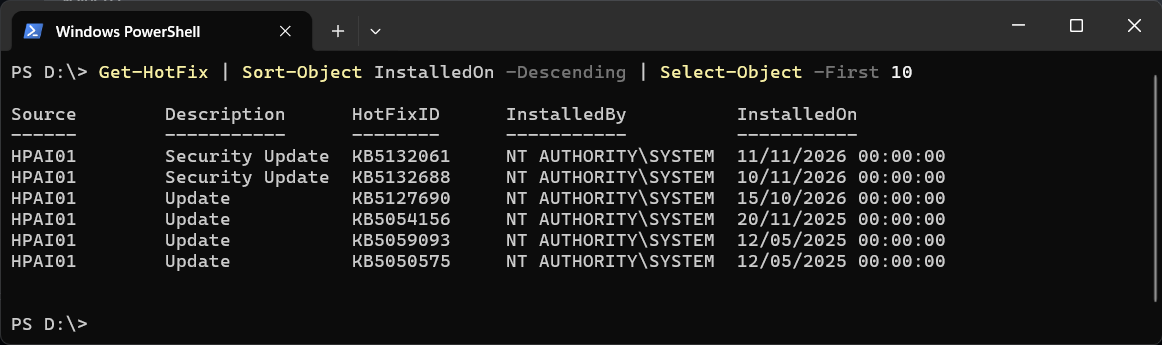
To list the Windows updates installed on a machine, newest first:
Get-HotFix | Sort-Object InstalledOn -Descending | Select-Object -First 10
Source  Description     HotFixID  InstalledBy          InstalledOn
------  -----------     --------  -----------          -----------
PC01    Security Update KB5xxxxxx NT AUTHORITY\SYSTEM  11/11/2026 00:00:00
PC01    Update          KB5xxxxxx NT AUTHORITY\SYSTEM  15/10/2026 00:00:00
HotFixID is the KB number you can search for, and Description says whether it was a security update. InstalledOn holds the date only, which is why the time is always midnight, and it is shown in your own date format. It runs without Administrator and works the same in Windows PowerShell 5.1 and PowerShell 7.
Check Whether One Update Is Installed
Get-HotFix -Id KB5xxxxxx
Swap in the KB number you are checking. If it is installed you get its row. If it is not, you get an error:
Get-HotFix : Cannot find the requested hotfix on the 'localhost' computer. Verify the input and run the command again.
In a script, turn that into a yes or no:
if (Get-HotFix -Id KB5xxxxxx -ErrorAction SilentlyContinue) { 'Installed' } else { 'Not installed' }Updates From the Last 30 Days
Get-HotFix | Where-Object InstalledOn -gt (Get-Date).AddDays(-30)
InstalledOn is a real date, not text, so date comparisons like this work as you would expect.
On Another Machine
Get-HotFix -ComputerName SERVER01
This queries the remote machine over WMI, so your account needs admin rights there and its firewall has to allow remote management.
The Common Gotcha: the List Is Shorter Than You Expect
Get-HotFix reads the Win32_QuickFixEngineering class, and that only covers updates to Windows itself. Microsoft documents that updates installed by Windows Installer (MSI) or from the Windows Update site are not returned. On my machine it returned six entries, and none of the SQL Server hotfixes that show up under installed programs were among them.
So Get-HotFix answers “is this Windows update installed”, which is usually the question during a patching check. For updates to SQL Server or other applications, see List Installed Programs with PowerShell, which lists their versions.
To see which updates are available but not installed yet, you need the PSWindowsUpdate module and its Get-WUList command. If that comes back as not recognized, Get-WUList Is Not Recognized: Install the PSWindowsUpdate Module has the fix.
If you are checking a list of servers for one KB and want a script for it, ask Claude Code to write it. That’s what it’s there for.
Related
If SQL Server is part of your day job, my current work lives over at sqldba.blog: production DBA scripts, an error library and the SSMS guide.
Leave a Reply