Python on Windows stops a script with this when it prints a character outside the old Windows code page:
Traceback (most recent call last):
  File "D:\demo\arrow.py", line 1, in <module>
    print("Published → sqldba.blog")
  File "C:\...\Python313\Lib\encodings\cp1252.py", line 19, in encode
    return codecs.charmap_encode(input,self.errors,encoding_table)[0]
UnicodeEncodeError: 'charmap' codec can't encode character '\u2192' in position 10: character maps to <undefined>
The quick fix is to tell Python to write its output as UTF-8. For one run:
$env:PYTHONIOENCODING = 'utf-8'
python .\your_script.py
Or for good, so every Python on the machine does it:
setx PYTHONUTF8 1
Open a new terminal after setx, because the window you ran it in keeps its old environment.
Why Python Picks cp1252
Python has to turn text into bytes before it can write it anywhere, and on Windows it picks the encoding from the system code page. On an English Windows install that is cp1252, which has no arrow, no box-drawing characters and no emoji. The character in the error, \u2192 here, is the one that has no place in it.
It shows up most when the output is not going straight to a console window: redirected to a file, piped into another program, or captured by something that runs the script for you, like a scheduled task, a CI job or an AI coding agent. In a console window, Python 3.6 and later write through the Windows console’s own Unicode API (PEP 528), so the same print usually works when you run the script by hand. That is why a script can work for you and fail the moment something else runs it.
This is how I kept hitting it. My Claude Code helper scripts printed post titles and excerpts pulled from WordPress, and an arrow, a long dash or an emoji in one of them was enough. Claude Code captures the script’s output, so it was never a console window, and one batch died mid-run on a single character.
Writing a file has the same problem. open(path, 'w') without an encoding also uses cp1252, and the file has already been emptied by the time the write fails, so you lose the old contents too. Give it encoding='utf-8', and for a file that matters, write to a temporary file and swap it in with os.replace().
Reproduce It
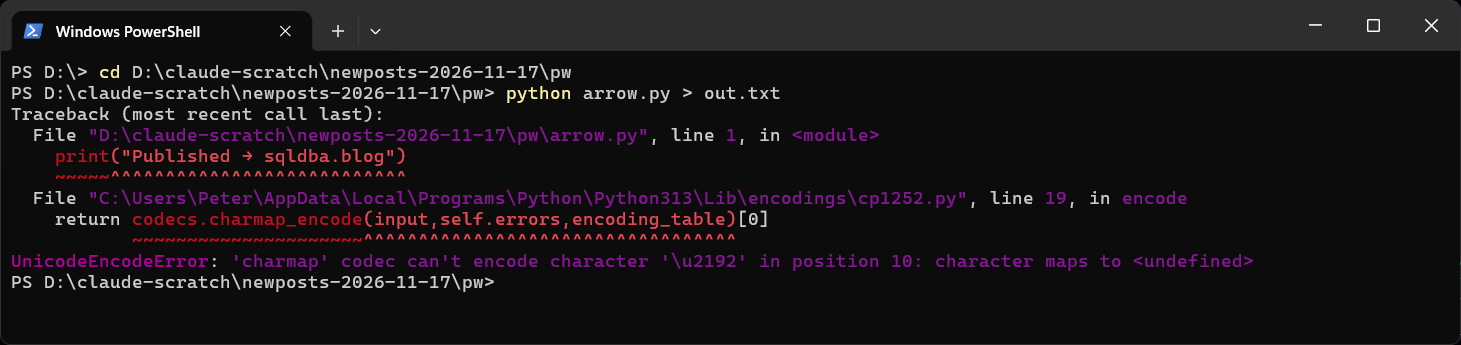
Save this as arrow.py:
print("Published → sqldba.blog")Then run it with the output redirected to a file. Redirecting fails in any terminal, so this reproduces it every time:
python arrow.py > out.txt
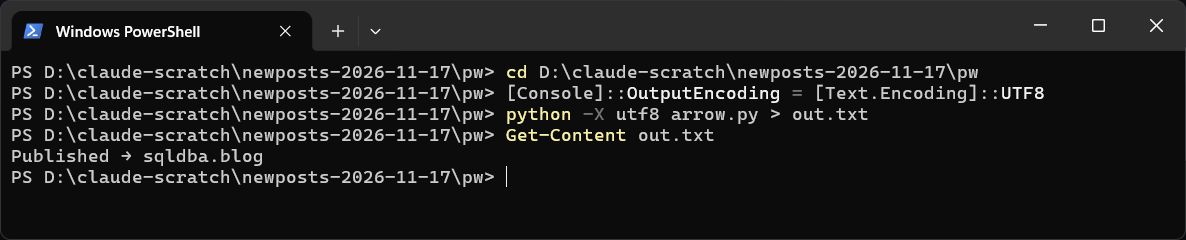
[Console]::OutputEncoding = [Text.Encoding]::UTF8
python -X utf8 arrow.py > out.txt
Get-Content out.txt
The first line gives the traceback. The second tells PowerShell to read Python’s output as UTF-8. Leave it out on Windows PowerShell 5.1 and the arrow still lands in the file, but as ΓåÆ, because the > redirect decodes the bytes with the console code page. The third line writes the output as UTF-8, and the fourth shows the arrow came through.
Fix It for One Run: PYTHONIOENCODING
$env:PYTHONIOENCODING = 'utf-8'
python arrow.py > out.txt
PYTHONIOENCODING sets the encoding for standard input, output and error only. It lasts as long as the PowerShell window. In Command Prompt it is set PYTHONIOENCODING=utf-8. This is the one I put in front of long-running scripts, so one odd character cannot take the whole run down.
Fix It Everywhere: UTF-8 Mode
python -X utf8 arrow.py
setx PYTHONUTF8 1
UTF-8 mode does more than the output. It also makes UTF-8 the default for open(), so it fixes the file write above as well. -X utf8 turns it on for one run, and PYTHONUTF8=1 turns it on for every run. The one thing to watch: an older script that reads cp1252 files without naming an encoding will now read them as UTF-8, and any byte that is not valid UTF-8 raises a UnicodeDecodeError instead. Give those encoding='cp1252' explicitly.
PEP 686 makes UTF-8 mode the default from Python 3.15. Python 3.13 and 3.14 on my machine both still failed the repro above.
Fix It in the Script
If you cannot control how the script is run, set it at the top of the script itself:
import sys
sys.stdout.reconfigure(encoding="utf-8")

print("Published → sqldba.blog")
That needs Python 3.7 or later. Do the same for sys.stderr if you print errors with odd characters in them.
If the output does not need the character at all, strip it before printing:
print(''.join(c for c in s if ord(c) < 128))That drops anything outside plain ASCII and the arrow simply disappears. sys.stdout.reconfigure(errors='replace') keeps the cp1252 encoding and prints a ? in its place instead. Both keep the script running, which is sometimes all a batch job needs.
Why chcp 65001 Does Not Fix It
chcp 65001 switches the console window to UTF-8, and it is the first thing most answers suggest. It does not help here. Python picks the encoding for a pipe or a file from the system code page, not the console’s, so with chcp 65001 set the redirected run above still failed with the same error.
Windows Terminal and the older console window behave the same way for this error, because neither is involved once the output is redirected. Where they differ is drawing the character in a console window: Windows Terminal shows an emoji, the older console often shows a box.
If you are not sure which fix fits, paste the traceback into Claude Code and ask which line printed the character. That’s what it’s there for. If an agent is running your scripts, a line in its CLAUDE.md telling it to set PYTHONIOENCODING=utf-8 saves the next crash.
Related
If SQL Server is part of your day job, my current work lives over at sqldba.blog: production DBA scripts, an error library and the SSMS guide.
Leave a Reply