To check if PowerShell is running as administrator, ask Windows whether the current session holds the Administrators role:
([Security.Principal.WindowsPrincipal][Security.Principal.WindowsIdentity]::GetCurrent()).IsInRole(
    [Security.Principal.WindowsBuiltInRole]::Administrator)
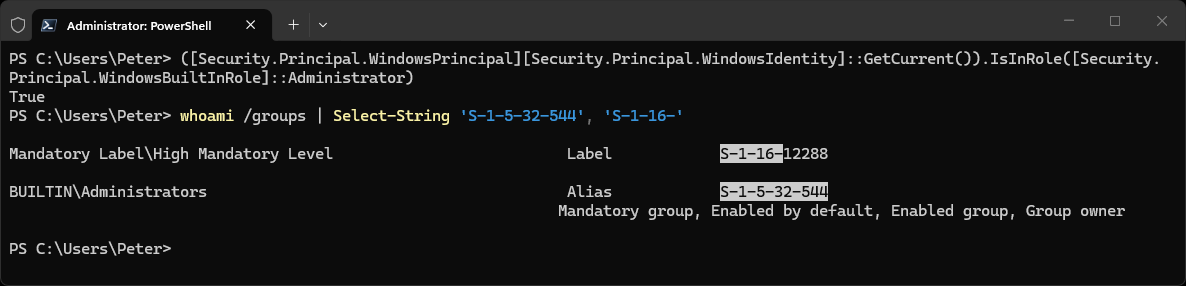
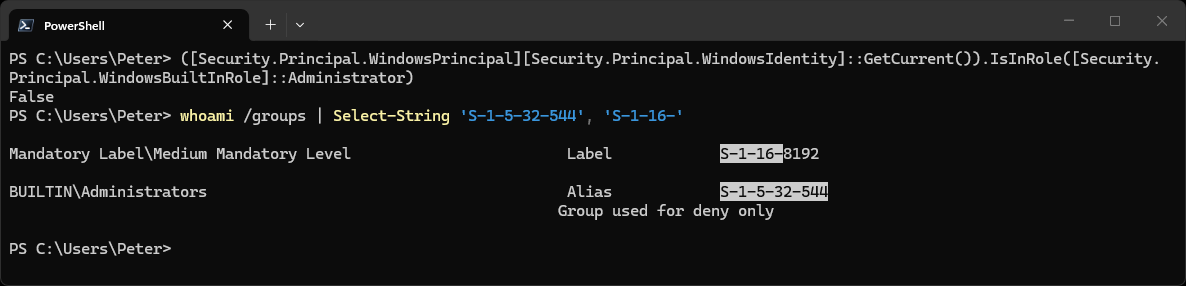
True means the window is elevated. False means it is not, even if your account is an administrator. The screenshot shows both on the same admin account: True in an elevated window first, then False in a normal one.
The same check in a normal, non-elevated window:
Use It in a Script
Store the result and stop early with a clear message, before the script gets halfway and fails on something that needs elevation:
$isAdmin = ([Security.Principal.WindowsPrincipal][Security.Principal.WindowsIdentity]::GetCurrent()).IsInRole(
    [Security.Principal.WindowsBuiltInRole]::Administrator)

if (-not $isAdmin) {
    Write-Warning 'Run this script from an elevated PowerShell window.'
    exit 1
}
Or Let PowerShell Refuse for You
If a script should never run without elevation, put this as its first line:
#Requires -RunAsAdministrator
PowerShell then refuses to run the script at all in a normal window. Windows PowerShell 5.1 says:
The script 'demo.ps1' cannot be run because it contains a "#requires" statement for running as Administrator. The current Windows PowerShell session is not running as Administrator. Start Windows PowerShell by using the Run as Administrator option, and then try running the script again.
PowerShell 7 gives the same message with “Windows PowerShell” changed to “PowerShell”. It only works in a script file. Typed at the prompt, the line is just a comment.
Being an Admin Is Not the Same as Running as One
With User Account Control on, an administrator account gets two tokens, and a normal window uses the limited one. You can see this with whoami:
whoami /groups | Select-String 'S-1-5-32-544', 'S-1-16-'
In a normal window the Administrators group shows as Group used for deny only and the label is S-1-16-8192, medium integrity. Elevated, the group is enabled and the label is S-1-16-12288, high integrity. That is why checking group membership is the wrong test, and IsInRole is the right one: it looks at the token the session is actually using.
Windows PowerShell 5.1 and PowerShell 7
The IsInRole check returned the same result in both, and the #Requires line works in both. The differences I saw were the wording of the #Requires error above, and that PowerShell 7 has an automatic $IsWindows variable which is empty in 5.1. That matters only if your script also runs on Linux or macOS, where this Windows check does not apply.
The Common Gotcha: Elevation Is per Window
Elevating one window does nothing for the others. A script started from a normal window runs without elevation even if another window on screen is elevated, and a scheduled task runs elevated only if the task is set to run with highest privileges. If a check says False when you expected True, look at which window or task actually started the script.
To open an elevated window, right-click PowerShell or Windows Terminal and pick Run as administrator. On Windows 11 there is also Sudo for Windows.
If a script still fails with access denied after the check passes, paste the error into Claude Code and ask what else needs permission. That’s what it’s there for.
Related
If SQL Server is part of your day job, my current work lives over at sqldba.blog: production DBA scripts, an error library and the SSMS guide.
Leave a Reply