
Claude Code deletes your session transcripts after 30 days. There is no warning, no message, nothing in the terminal. The sessions just stop appearing in /resume, and the .jsonl files behind them are gone.
I found out on 9 November, trying to add up what a year of running agents had cost me for 2026, the Year of Running AI Agents. Everything before 9 October was gone. The transcripts were where I was reading the token usage from, so 2 months of the year had to be estimated from the git commit rate instead. If you want that history, you have to change one setting before the sweep gets to it.
Where the Transcripts Live
Every session is written continuously to a JSONL file, one per session, under your user profile:
~/.claude/projects/<project>/<session-id>.jsonl

# on Windows
C:\Users\<you>\.claude\projects\C--Users-<you>-my-project\<session-id>.jsonl
The project folder is your working directory with every non-alphanumeric character swapped for a hyphen. Subagent transcripts sit in a subagents folder under the parent session and go when it goes. claude --continue, claude --resume and rewind all read these files, so once they are deleted those stop working for the old sessions too.
They are not small. Mine, every project on this laptop, 30 days:
Get-ChildItem "$env:USERPROFILE\.claude\projects" -Recurse -Filter *.jsonl |
    Measure-Object Length -Sum |
    Select-Object Count, @{n='GB';e={[math]::Round($_.Sum/1GB,1)}}
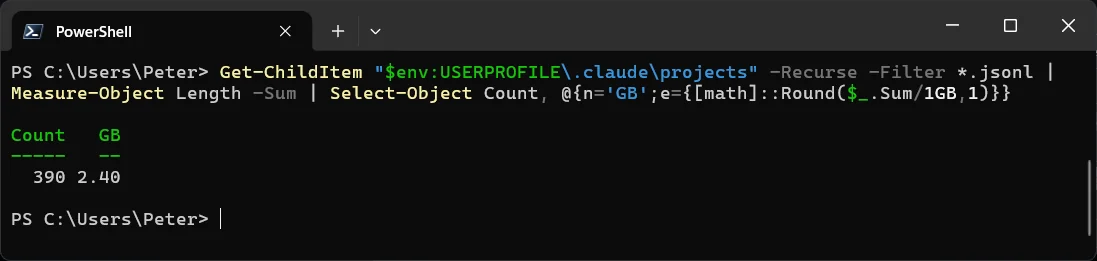
That came back at 2.4 GB across 390 files, and transcripts were part of what filled my C: drive to 0 bytes in October. So the default is not a bad one. It is just silent, and the day it bites is the day you go looking for something older than a month.
The Setting: cleanupPeriodDays
Retention is cleanupPeriodDays in settings.json, a top-level key. The user file is ~/.claude/settings.json (the basics of that file are in Install Claude Code on Windows, Native and in WSL). Default 30, minimum 1, and 0 is not “keep forever”, it fails validation. For long retention Anthropic’s own example is 3650:
{
  "cleanupPeriodDays": 3650
}

Claude Code runs the sweep in the background shortly after a session starts and deletes anything older than the period. If the setting is broken (a string, a 0), the sweep pauses and /status shows a warning, which is the one place the behaviour is visible at all. Sessions started from Claude Desktop have their own key, desktopSessionCleanupPeriodDays, and are kept past this period by default.
My own settings.json did not have the key, which is how the default got me. Check yours before assuming:
Select-String cleanupPeriodDays "$env:USERPROFILE\.claude\settings.json"
# no output means the 30 day default is in force
Keeping Them Without Filling the Disk
Move the folder off C:. CLAUDE_CONFIG_DIR relocates the whole .claude directory, transcripts included. Set it as a user environment variable pointing at a drive with room and restart your terminal.
Or copy, and let the sweep run. A scheduled robocopy of ~/.claude/projects to another drive keeps every transcript ever written while the live folder stays at 30 days. How to Run PowerShell Scripts with Task Scheduler is the scheduling side; the copy itself is one line:
robocopy "$env:USERPROFILE\.claude\projects" "D:\claude-transcripts" /E /XO /R:1 /W:1
Mind what is in them. The files are plaintext and they hold tool output, file contents, and anything a command printed, which can include a credential. Anthropic’s docs say OS file permissions are the only protection. A longer retention means that folder is worth treating like a backup set, not a cache.
The format is internal. Anthropic says so, and that it changes between versions. A script that parses the JSONL for token counts, which is what I was doing, can break on any release. /export gives you a readable copy of a session if that is all you need.
Frequently Asked Questions
Can I get the deleted transcripts back?
Not from Claude Code. The sweep deletes the files; there is no bin. If the folder was in a backup or in File History, restore from there. Otherwise they are gone, which is why this post exists.
Does this affect what Anthropic keeps on their side?
No. cleanupPeriodDays is local only. Server-side retention is a separate policy that depends on your plan, and it is documented on the data usage page, not in settings.
Is it 30 days from when the session started?
From its last activity. A session you keep resuming stays. One you have not opened for 30 days is the one that goes.
Can I stop transcripts being written at all?
Yes. CLAUDE_CODE_SKIP_PROMPT_HISTORY suppresses them, and --no-session-persistence does it for a single claude -p run. You lose resume and rewind for those sessions.
Related
- Install Claude Code on Windows, Native and in WSL
- 2026, the Year of Running AI Agents
- How to Run PowerShell Scripts with Task Scheduler
- How to Copy Files and Folders with PowerShell
- How to Get a Folder Size in PowerShell
- Fix “.ps1 cannot be loaded because running scripts is disabled on this system” in PowerShell (the npm.ps1 error on a fresh Claude Code install)
- Claude Code settings reference: cleanupPeriodDays
- Claude Code sessions: where transcripts are stored
- The .claude directory: what is cleaned up automatically
If SQL Server is part of your day job, my current work lives over at sqldba.blog: production DBA scripts, an error library and the SSMS guide.
Leave a Reply