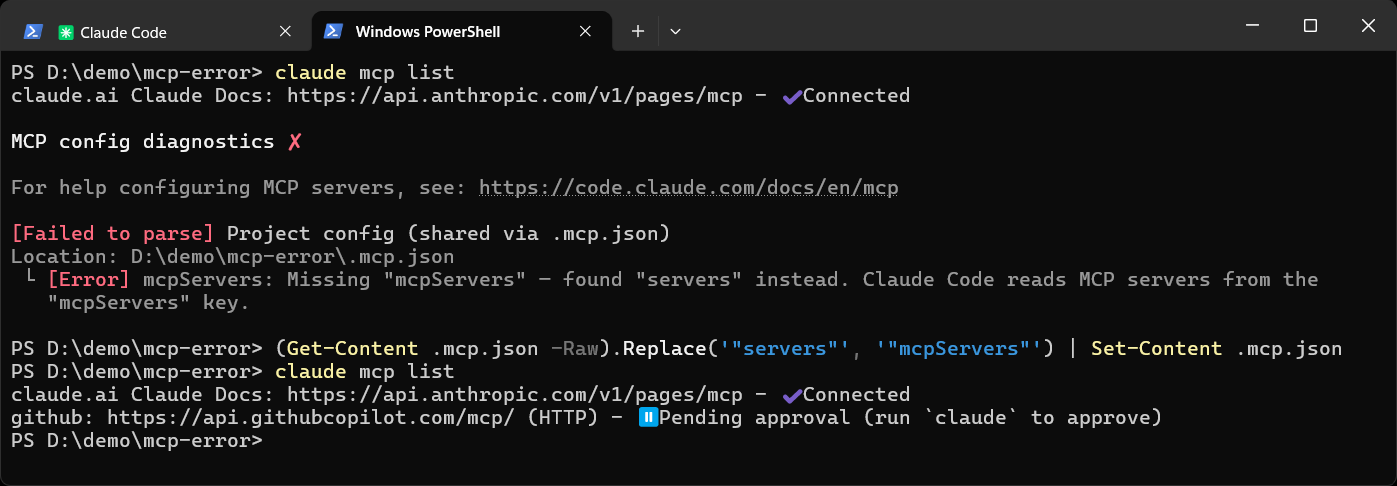
You ran claude mcp list and Claude Code printed this under MCP config diagnostics:
[Failed to parse] Project config (shared via .mcp.json)
Location: C:\Users\Peter\.mcp.json
 └ [Error] mcpServers: Missing "mcpServers" — found "servers" instead. Claude Code reads MCP servers from the "mcpServers" key.
Claude Code has found a .mcp.json file where the servers sit under a top-level key called servers. It only reads mcpServers. A file with servers in it was written in the format VS Code and GitHub Copilot use for their own MCP file, and it is sitting where Claude Code looks for project config.
The Location: line is the file. Open it and look at the first key, with your own path swapped in:
Get-Content "$env:USERPROFILE\.mcp.json"
The fix depends on which tool the file is for, so settle that before you change anything.
The Two Formats
Same idea, different wrapper. VS Code reads this from .vscode\mcp.json:
{
  "servers": {
    "github": {
      "type": "http",
      "url": "https://api.githubcopilot.com/mcp/"
    }
  }
}
Claude Code reads this from .mcp.json:
{
  "mcpServers": {
    "github": {
      "type": "http",
      "url": "https://api.githubcopilot.com/mcp/"
    }
  }
}
The server entries inside are close to the same in both: type, command, args, env, url, headers. Two differences from the docs are worth knowing:
- A VS Code file can have an
inputsblock and${input:name}placeholders that prompt you for a secret. That is a VS Code feature. Claude Code expands environment variables, written${VAR}. - In Claude Code an entry with a
urlmust also have atype, such ashttp. An entry with notypeis read as a local stdio server.
Why It Shows Up in Every Project
Mine was at C:\Users\Peter\.mcp.json, in my user folder and not in any project. Claude Code looks for .mcp.json in the folder you start it from and in the folders above it, so one file in the user folder is picked up from every project underneath. That is why the error can appear in a project that has no .mcp.json of its own. The Location: line tells you which file it really is.
If the File Is for Claude Code
Rename the key from servers to mcpServers in any editor and save, or swap it from PowerShell in the same folder, then run the list again:
(Get-Content .mcp.json -Raw).Replace('"servers"', '"mcpServers"') | Set-Content .mcp.json
claude mcp list
The error is gone and the server is listed. A server from a .mcp.json shows as Pending approval until you start claude in that folder and approve it, because Claude Code asks before it uses servers from a project file. The claude.ai Claude Docs line in my list is a connector from my claude.ai account, which Claude Code shows alongside servers from files.
You do not have to write the file by hand. claude mcp add with --scope project writes .mcp.json in the right format, and Add an MCP Server to Claude Code covers the scopes.
If the File Is for VS Code
Leave the contents alone and move the file to where VS Code looks for that format, .vscode\mcp.json in the workspace:
New-Item -ItemType Directory -Force .vscode | Out-Null
Move-Item .mcp.json .vscode\mcp.json
Once it is out of the way, Claude Code has nothing to complain about. If the file is in your user folder and not in a workspace, VS Code keeps user-wide servers in its own user configuration, which you open from the Command Palette with MCP: Open User Configuration. Copy the servers in there and remove the stray file.
One thing to check first. VS Code’s MCP configuration reference now describes a newer Copilot setup that reads .mcp.json with mcpServers, the same file and key Claude Code uses, and it treats .vscode\mcp.json as the older format. If your Copilot is on the newer setup, renaming the key may be the right fix for both tools.
If You Use Both
Keep each tool’s servers in its own place: VS Code’s in .vscode\mcp.json, Claude Code’s in .mcp.json or added with claude mcp add. The same server can be defined in both. Claude Code in VS Code on Windows covers running the two side by side.
If the file has several servers and you are not sure how each one maps across, paste it into Claude Code with any keys taken out and ask it to convert the file. That’s what it’s there for.
Frequently Asked Questions
Does this error stop Claude Code from working?
No. Claude Code still runs and the MCP servers from other places still connect. Only the servers in that one file are skipped until the key is fixed.
Can I keep both keys in the same file?
Claude Code stops reporting the error once mcpServers is there and ignores a servers key beside it. It means keeping two copies of every server in one file, so a file per tool is cleaner.
Where do I put servers I want in every project?
Not in a .mcp.json in your user folder. Add them with claude mcp add --scope user, which stores them in ~/.claude.json and loads them in all your projects.
Related
If SQL Server is part of your day job, my current work lives over at sqldba.blog: production DBA scripts, an error library and the SSMS guide.
Leave a Reply