Your JSON has "System.Collections.Hashtable" where the nested data should be. Add -Depth:
$config | ConvertTo-Json -Depth 10
ConvertTo-Json only writes two levels of nesting unless you ask for more. Anything deeper is replaced by its type name, so a hashtable becomes System.Collections.Hashtable and a [pscustomobject] becomes something like @{d=1}.
See It Happen
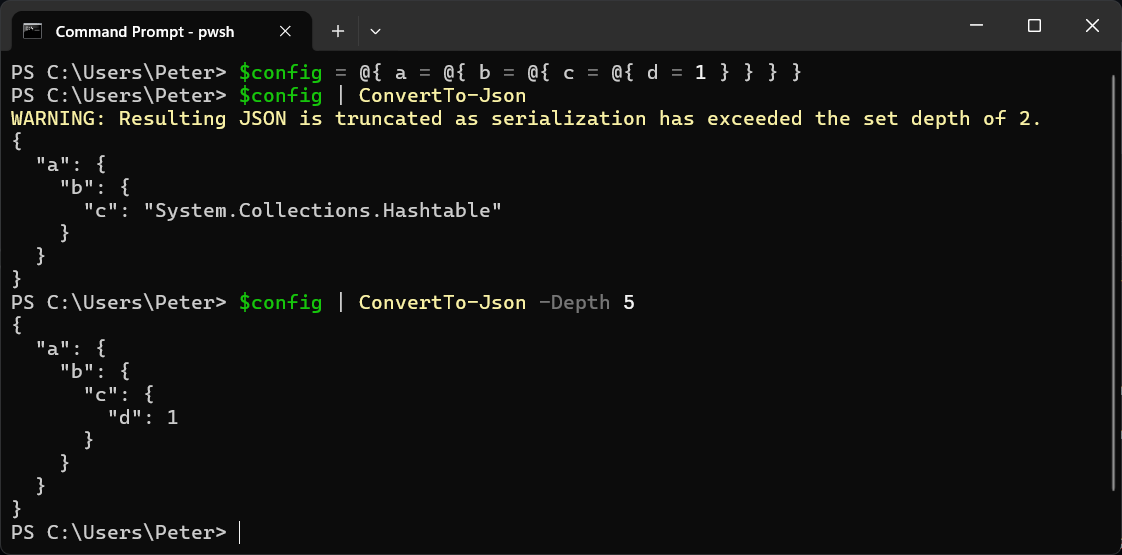
$config = @{ a = @{ b = @{ c = @{ d = 1 } } } }
$config | ConvertTo-Json
$config | ConvertTo-Json -Depth 5
The first command gives this:
{
  "a": {
    "b": {
      "c": "System.Collections.Hashtable"
    }
  }
}
The second gives the whole object, with "d": 1 at the bottom.
5.1 Says Nothing, 7 Warns
PowerShell 7 prints a warning when it cuts the output short:
WARNING: Resulting JSON is truncated as serialization has exceeded the set depth of 2.
Windows PowerShell 5.1 does the same truncation with no warning at all. If a script was written in 7 and runs under 5.1, or the warning stream is not shown, the first you hear of it is the system that receives the JSON rejecting it.
Where It Bites: API Request Bodies
Request bodies for web APIs are usually three or four levels deep. This is a message with its content as a list of blocks:
$body = @{
    model    = 'claude-opus-5-5'
    messages = @(
        @{ role = 'user'; content = @( @{ type = 'text'; text = 'hi' } ) }
    )
}
$body | ConvertTo-Json -Compress
Without -Depth, the content comes out as "content":"System.Collections.Hashtable", and the API returns a 400 that does not mention depth. With -Depth 10 it is correct. Calling a web API from PowerShell builds a body like this one.
How High to Set It
Set it higher than your data needs. There is no cost to a depth you do not use. The maximum is 100, and anything above that is an error. -Depth 10 covers almost every config file and request body.
The Other Gotcha: One-Item Arrays
Piping an array into ConvertTo-Json sends the items one at a time, so an array of one comes out as a single value:
@('one') | ConvertTo-Json -Compress
ConvertTo-Json -InputObject @('one') -Compress
The first gives "one". The second gives ["one"]. If the receiving side expects a list, pass the array with -InputObject. An array inside a hashtable, like @{ list = @('one') }, keeps its brackets either way.
Reading JSON Back In
ConvertFrom-Json has a -Depth too, but its default in PowerShell 7 is 1024, so you will rarely need it. The problem is almost always on the way out.
If the JSON is going to a CSV rather than an API, flatten it first. How to Export Data to CSV in PowerShell has the options.
Related
If SQL Server is part of your day job, my current work lives over at sqldba.blog: production DBA scripts, an error library and the SSMS guide.
Leave a Reply