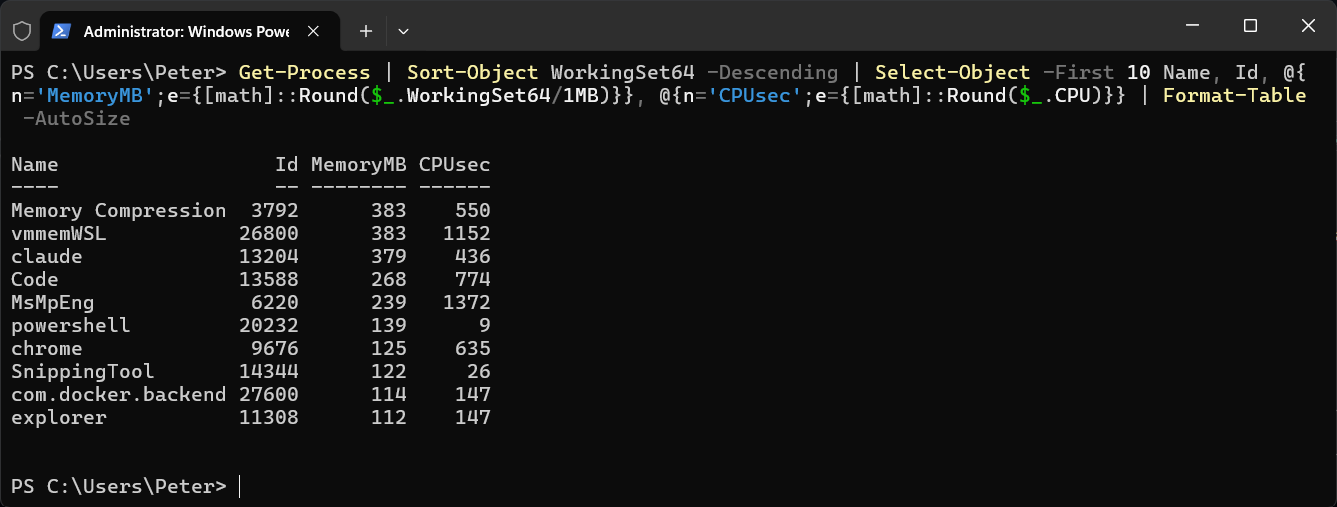
To see which processes are using the most memory on your machine, sort Get-Process by working set and take the top ten:
Get-Process | Sort-Object WorkingSet64 -Descending |
    Select-Object -First 10 Name, Id,
        @{n='MemoryMB';e={[math]::Round($_.WorkingSet64/1MB)}},
        @{n='CPUsec';e={[math]::Round($_.CPU)}} |
    Format-Table -AutoSize
In the shot, Memory Compression and vmmemWSL are joint top at 383 MB, followed by claude, Code and MsMpEng.
What the Columns Mean
- WorkingSet64 is the physical memory the process is using right now, in bytes. Dividing by
1MBturns it into megabytes. - CPU is the total processor seconds the process has used since it started. It is not the current CPU percentage, so a long-running process can show a big number while sitting idle.
- vmmemWSL is the WSL 2 virtual machine. If it is near the top, Limit WSL Memory and CPU shows how to cap it.
Total Memory per Program
Browsers and editors run as many processes, so each one only gets a single row above. Group them by name to see the total for each program:
Get-Process | Group-Object Name |
    Select-Object Name, Count,
        @{n='MemoryMB';e={[math]::Round(($_.Group | Measure-Object WorkingSet64 -Sum).Sum/1MB)}} |
    Sort-Object MemoryMB -Descending | Select-Object -First 10
Sort by CPU Instead
Get-Process | Sort-Object CPU -Descending | Select-Object -First 10 Name, Id, CPU
The commands work the same in Windows PowerShell 5.1 and PowerShell 7. Once you know which process it is, Kill a Process by Name or ID in PowerShell covers stopping it.
Related
If SQL Server is part of your day job, my current work lives over at sqldba.blog: production DBA scripts, an error library and the SSMS guide.
Leave a Reply