 More of my SQL Server writing is at sqldba.blog, including the production version of this task: Move a Table to Another Schema, with permissions and references.
To move a table to a different schema in SQL Server, create the schema if it does not exist, then run ALTER SCHEMA <new schema> TRANSFER <old schema>.<table>. This post is the short walkthrough in SSMS, using the DimCurrency table in AdventureWorksDW, moving it from dbo to a new finance schema.
One thing to know first: SQL Server has no command to rename a schema. “Renaming” one means creating the new schema, transferring every object into it, and dropping the old one, which is the same statement below run once per object.
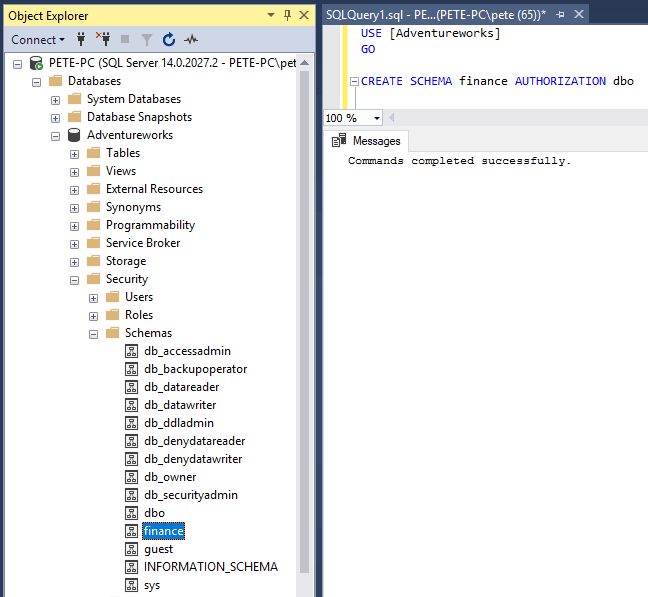
Create the New Schema
If the target schema does not exist yet, create it. dbo as the owner is fine for most databases:
-- Run in the database that holds the table (AdventureWorksDW here)
-- Change finance to the schema name you want
CREATE SCHEMA [finance] AUTHORIZATION dbo;
Transfer the Table
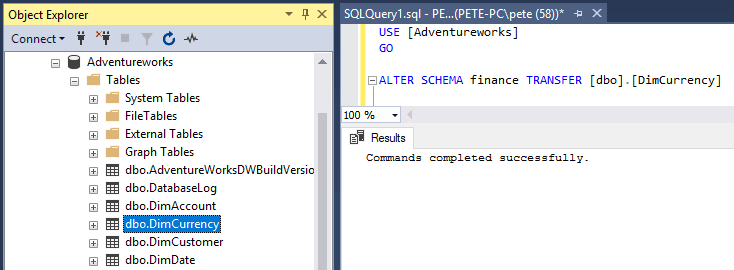
The schema named straight after ALTER SCHEMA is where the table is going. The table you name after TRANSFER is where it is now:
-- Change finance (where it goes) and dbo.DimCurrency (where it is now)
ALTER SCHEMA finance TRANSFER dbo.DimCurrency;
Check the Move
Refresh the Tables folder in Object Explorer and the table now shows as finance.DimCurrency. If the query window underlines the new name in red, that is IntelliSense being out of date: press Ctrl+Shift+R to refresh it.
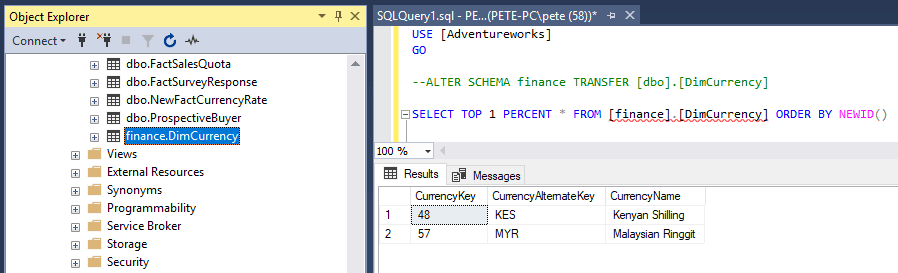
Or check from a query:
-- Which schema is the table in now? Change DimCurrency to your table name
SELECT s.name AS schema_name, t.name AS table_name
FROM sys.tables AS t
JOIN sys.schemas AS s ON s.schema_id = t.schema_id
WHERE t.name = N'DimCurrency';
Before You Do This on Production
On a test database that is all there is to it. On a database people use, the statement is the easy part. I re-tested this on SQL Server 2025 (the screenshots are from the original AdventureWorks walkthrough), and three things need planning:
- The table’s permissions are dropped by the transfer, so any user or role that had
SELECTon it loses it. - Views, procedures and application code that use the old name break. Nothing updates them for you.
- A table used by a view created
WITH SCHEMABINDINGwill not move at all. SQL Server stops the transfer with Msg 15348, and the view has to be dropped or changed first.
How to script the permissions back, find everything that references the table, and use a synonym to keep old code working is all in Move a Table to Another Schema in SQL Server on sqldba.blog. It is the version I would follow on a production server. Microsoft’s reference is ALTER SCHEMA (Transact-SQL).
Leave a Reply