If your catch block never runs, the error is probably non-terminating. Add -ErrorAction Stop to the command inside try:
try {
    Get-Item C:\nope-folder -ErrorAction Stop
    'never printed'
}
catch {
    "Caught: $($_.Exception.Message)"
}
Why catch Was Skipped
Most cmdlet errors are non-terminating. PowerShell prints the error and carries on with the next line, and catch only runs for terminating errors. Without -ErrorAction Stop, a try around a cmdlet usually does nothing.
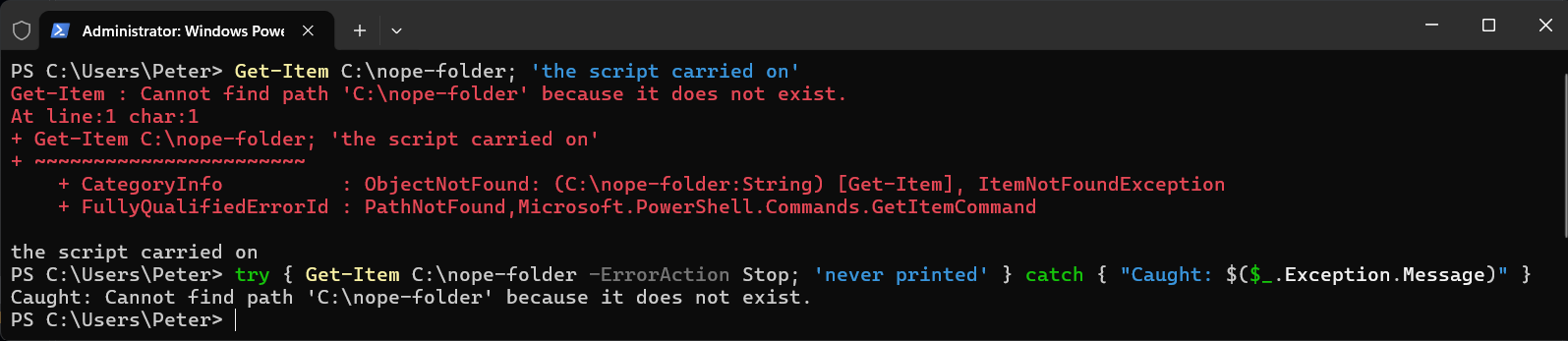
In the shot, the first line runs Get-Item on a folder that does not exist. It prints the red error, and then the script carried on. The second line is the same Get-Item inside try with -ErrorAction Stop. The error becomes terminating, 'never printed' is skipped, and the catch block prints Caught: Cannot find path 'C:\nope-folder' because it does not exist.
Stop on Every Error in a Script
Rather than adding -ErrorAction Stop to every line, set it once at the top of a script:
$ErrorActionPreference = 'Stop'
Every non-terminating error after that line is catchable, which is usually what you want in a scheduled script with nobody watching it.
Catch a Specific Error
try {
    Get-Item C:\nope-folder -ErrorAction Stop
}
catch [System.Management.Automation.ItemNotFoundException] {
    'Not there, carrying on'
}
catch {
    throw
}
finally {
    'This always runs'
}
The typed catch handles a missing path. Anything else falls through to the plain catch, where throw passes it on. finally runs either way, so it is the place to close connections or remove temp files. To find the type for an error you have just had, run $Error[0].Exception.GetType().FullName.
Windows PowerShell 5.1 and PowerShell 7
try, catch and -ErrorAction Stop work the same in both. What looks different is the error itself. 5.1 prints the long red block in the shot with CategoryInfo and FullyQualifiedErrorId, and PowerShell 7 prints a short one-line message. In 7, Get-Error shows the full detail of the last error.
Related
If SQL Server is part of your day job, my current work lives over at sqldba.blog: production DBA scripts, an error library and the SSMS guide.
Leave a Reply