To download a file, give Invoke-WebRequest the URL and where to save it:
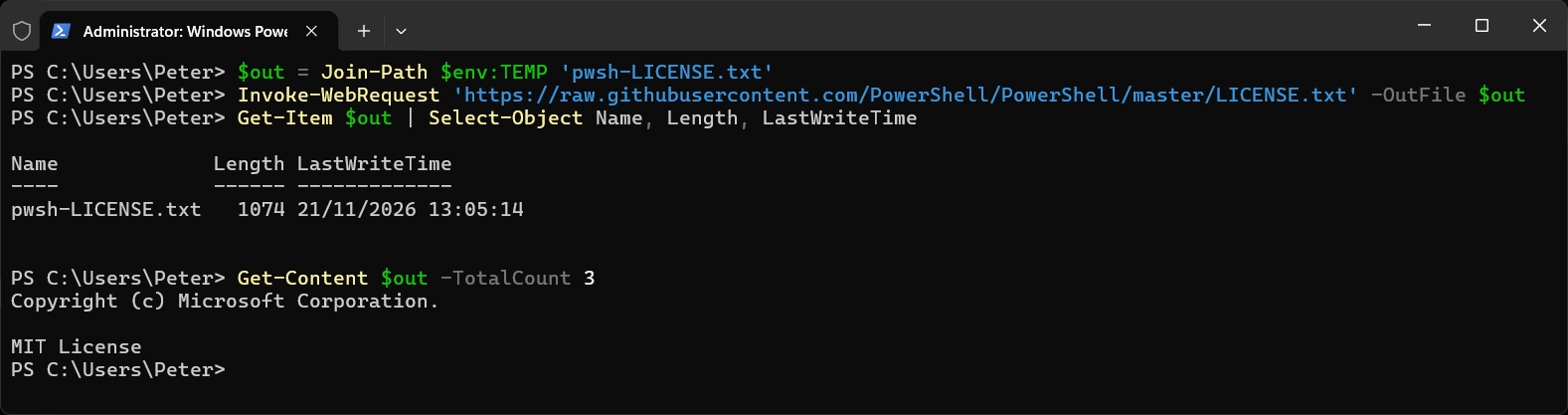
$out = Join-Path $env:TEMP 'pwsh-LICENSE.txt'
Invoke-WebRequest 'https://raw.githubusercontent.com/PowerShell/PowerShell/master/LICENSE.txt' -OutFile $out
-OutFile prints nothing when it works, so check the file:
Get-Item $out | Select-Object Name, Length, LastWriteTime
Get-Content $out -TotalCount 3
The file is 1074 bytes, and the first lines are the copyright line and MIT License.
Slow Downloads in Windows PowerShell 5.1
In 5.1 the progress bar slows big downloads down a lot. Turn it off for the session first:
$ProgressPreference = 'SilentlyContinue'
5.1 can also need -UseBasicParsing, and typing curl in 5.1 runs Invoke-WebRequest rather than curl. PowerShell curl: Why -Uri and -OutFile Stopped Working covers both.
Save Into a Folder in PowerShell 7
In PowerShell 7, -OutFile can be a folder, and the file keeps the name from the URL:
Invoke-WebRequest 'https://raw.githubusercontent.com/PowerShell/PowerShell/master/LICENSE.txt' -OutFile $env:TEMP
That saves LICENSE.txt in the TEMP folder. PowerShell 7 also has -Resume for picking up a large download that was cut off. Add -PassThru in either version if you want the response back as well as the file, for example to check StatusCode.
Check the File Before You Run It
If the site publishes a checksum, compare it with Get-FileHash before running an installer.
Related
If SQL Server is part of your day job, my current work lives over at sqldba.blog: production DBA scripts, an error library and the SSMS guide.
Leave a Reply