To unblock a file you downloaded, run Unblock-File on it:
Unblock-File .\downloaded-script.ps1
And for everything in a folder:
Get-ChildItem .\scripts -Recurse -File | Unblock-File
What Unblock-File Removes
When a browser saves a file, Windows adds a small hidden stream to it called Zone.Identifier, known as the mark of the web. ZoneId=3 in that stream means the file came from the internet. This is what makes the file Properties dialog show an Unblock box, and what makes PowerShell treat a script as remote.
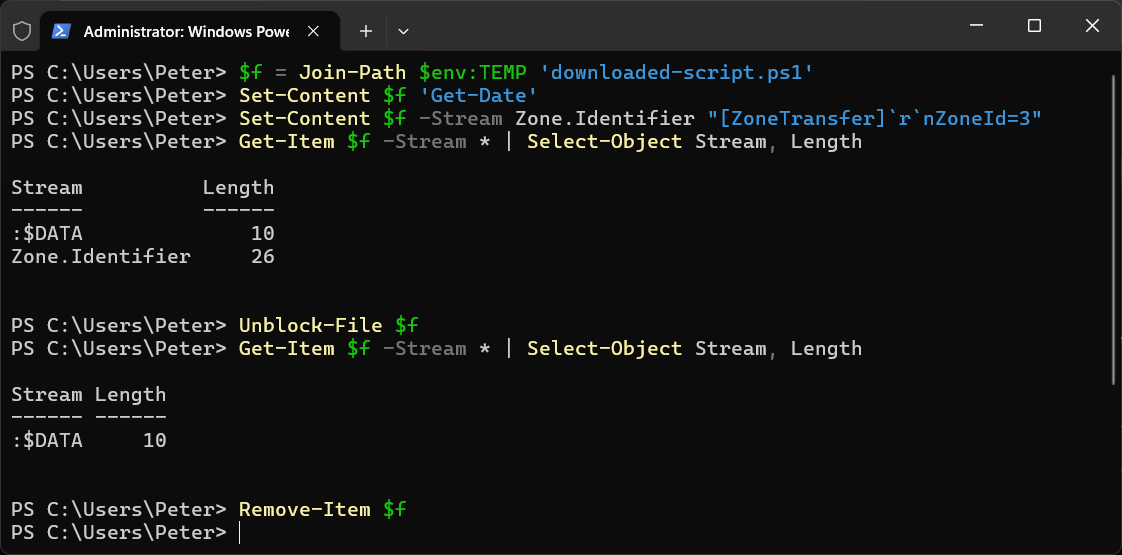
You can see it with -Stream. To try it safely, make a test file and add the stream by hand:
$f = Join-Path $env:TEMP 'downloaded-script.ps1'
Set-Content $f 'Get-Date'
Set-Content $f -Stream Zone.Identifier "[ZoneTransfer]`r`nZoneId=3"
Get-Item $f -Stream * | Select-Object Stream, Length
Unblock-File $f
Get-Item $f -Stream * | Select-Object Stream, Length
Remove-Item $f
Before Unblock-File the file has two streams, :$DATA (the content) and Zone.Identifier. After it, only :$DATA is left.
To read what the stream says on a real download, use Get-Content .\file.zip -Stream Zone.Identifier.
Why Scripts Need It
Under the RemoteSigned execution policy, local scripts run but a script with the mark of the web must be signed, so a downloaded script fails with is not digitally signed. Fix “.ps1 cannot be loaded because running scripts is disabled on this system” explains the policies. Unblocking is the right fix for a script you have read and trust. It is not a reason to loosen the policy.
Windows PowerShell 5.1 and PowerShell 7
Unblock-File and -Stream work the same in both on Windows. Streams are an NTFS feature, so a file copied to a FAT32 USB stick loses its mark along the way.
Related
If SQL Server is part of your day job, my current work lives over at sqldba.blog: production DBA scripts, an error library and the SSMS guide.
Leave a Reply