In Windows PowerShell 5.1, curl is an alias for Invoke-WebRequest. In
PowerShell 7 that alias is gone and curl runs curl.exe instead. Use
Invoke-WebRequest when you want the cmdlet, and curl.exe with real curl
flags when you want curl.
A one-liner that has worked for years suddenly does nothing useful, and the reason is that
curl means 2 different programs depending on which PowerShell you are in.
The Symptom
You run something like this in PowerShell 7 and it hangs, with a prompt you never asked for:
curl -Uri https://example.com/file.msi -UseBasicParsing -OutFile 'file.msi'
Enter host password for user 'tFile':
Nothing is wrong with the URL. curl.exe is reading -Uri as its own
-U flag, which means “user”, and taking the rest of the word as a username. Every
PowerShell parameter in that line is being chewed up as a curl short option, and it stops to ask
for the password that goes with the account it thinks you gave it.
What curl Actually Resolves To
Get-Command curl
$PSVersionTable.PSVersion
- Windows PowerShell 5.1:
curlcomes back as an Alias forInvoke-WebRequest. So dowgetandiwr. - PowerShell 7:
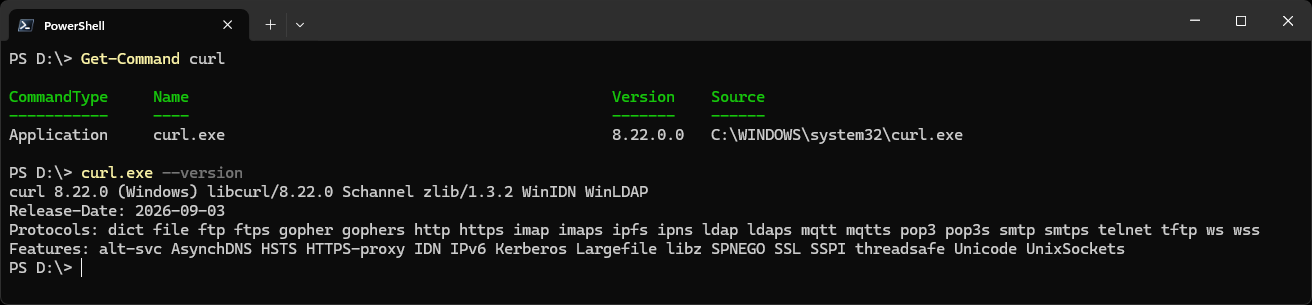
curlcomes back as an Application,C:\Windows\System32\curl.exe. The only alias left for the cmdlet isiwr.
Here it is in PowerShell 7: curl is the Application curl.exe in System32, and curl.exe --version shows real curl, 8.22.0.
That is not a quirk of one machine, it is documented both ways. The
Windows PowerShell 5.1 reference
lists iwr, curl and wget as aliases, and the
current reference
lists only iwr. Windows itself ships curl.exe in
System32, so on PowerShell 7 the name is not unclaimed, it just points at a different
program with a different set of flags.
Download a File, Either Way
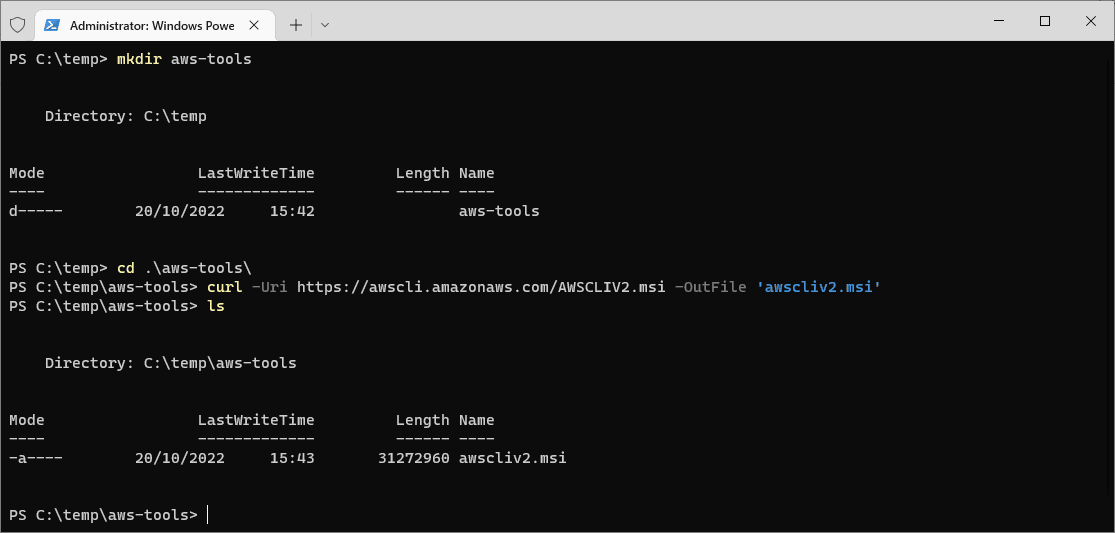
Here is the same job done twice. This is the AWS CLI installer, which is the download from my AWS CLI on Windows post:
# the cmdlet, works in 5.1 and 7
# -UseBasicParsing is a no-op in 7 and needed in 5.1, see below
Invoke-WebRequest -Uri https://awscli.amazonaws.com/AWSCLIV2.msi -OutFile 'awscliv2.msi' -UseBasicParsing

# real curl, works in 7 and in 5.1 if you spell out the .exe
curl.exe -L -o awscliv2.msi https://awscli.amazonaws.com/AWSCLIV2.msi

# then run the installer
.\awscliv2.msi
curl.exe in a script, never curl.
Spelling out the extension pins you to the real binary in both shells, so the script behaves the
same wherever it runs. The bare name is the thing that changes meaning underneath you.The -UseBasicParsing Flag
This one is worth getting right because it points in opposite directions in the 2 shells.
In PowerShell 7 it does nothing. The current reference says the parameter has been deprecated, that from PowerShell 6.0.0 all web requests use basic parsing only, and that it is kept for backwards compatibility with no effect on the cmdlet. Leave it out of anything you write for 7.
In Windows PowerShell 5.1 you now need it more than you used to. It was always
required where Internet Explorer is not installed, such as a Server Core box. On top of that, a
security update released on 9 December 2025 for CVE-2025-54100 changed the default behaviour: a
patched 5.1 stops on a confirmation prompt about script execution risk unless you pass
-UseBasicParsing, and
there is no other way to bypass that prompt.
-UseBasicParsing to every Invoke-WebRequest call that runs
unattended on Windows PowerShell 5.1.Related
If SQL Server is part of your day job, my current work lives over at sqldba.blog: production DBA scripts, an error library and the SSMS guide.
Leave a Reply