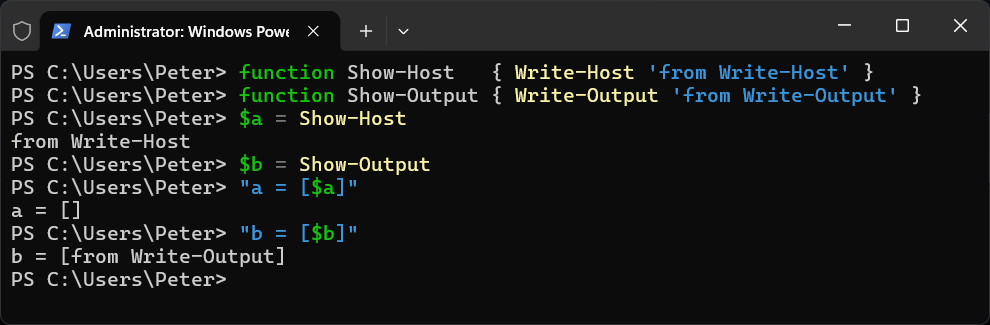
Write-Host writes to the screen. Write-Output writes to the pipeline, which is what a variable, a pipe or a file receives. Two small functions show it:
function Show-Host   { Write-Host 'from Write-Host' }
function Show-Output { Write-Output 'from Write-Output' }
$a = Show-Host
$b = Show-Output
"a = [$a]"
"b = [$b]"
$a = Show-Host prints from Write-Host straight away, and $a is empty. $b = Show-Output prints nothing, because the text went into $b.
Which One to Use
- Write-Output for results: anything a caller might store, pipe to
Export-CsvorSet-Clipboard, or test. - Write-Host for messages meant only for the person watching, like a coloured status line with
-ForegroundColor. - Write-Verbose for progress notes in a script. They only show when the script is run with
-Verbose.
In practice you rarely type Write-Output. A value on its own line, like 'done' or $result, goes to the pipeline anyway.
The Gotcha: Extra Output in a Function’s Result
Because anything not captured goes to the pipeline, a function returns every bit of output, not only what follows return. A Write-Output 'Starting' at the top of a function ends up in the result along with the real value. Use Write-Host or Write-Verbose for those messages.
Capturing Write-Host Anyway
Since PowerShell 5.0, Write-Host writes to the information stream, number 6. Redirect it to capture or hide it:
$a = Show-Host 6>&1
Show-Host 6>$null
This works the same in Windows PowerShell 5.1 and PowerShell 7. In older versions, Write-Host output could not be captured at all, which is where its bad name comes from.
Related
If SQL Server is part of your day job, my current work lives over at sqldba.blog: production DBA scripts, an error library and the SSMS guide.
Leave a Reply